INSTALLATION
PROCEDURE
1. INSTALL CENTER STOP LIGHT ASSEMBLY (for Bulb Type Stop Light)
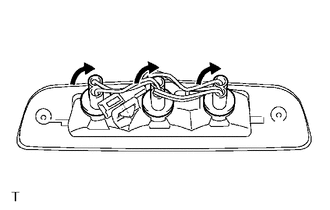
(a) Install the 3 center stop light bulbs to the 3 center stop light sockets.
|
(b) Turn the 3 center stop light sockets with 3 center stop light bulbs in the direction indicated by the arrow shown in the illustration to install them. |
|
(c) Connect the connector.
(d) Install the center stop light assembly with the 2 screws.
(e) Remove the protective tape.
2. INSTALL CENTER STOP LIGHT ASSEMBLY (for LED Type Stop Light)
(a) Connect the connector.
|
(b) Engage the 2 clips to install the center stop light assembly. |
|
.png)
(c) Install the 2 nuts.
Torque:
3.6 N·m {36 kgf·cm, 31 in·lbf}
(d) Remove the protective tape.
3. CONNECT ROOF HEADLINING ASSEMBLY (for LED Type Stop Light)
- for Double Cab:
(See page
.gif) )
) - for Access Cab:
(See page
)