Toyota Tacoma manuals

Toyota Tacoma (2015-2018) Service Manual: Disassembly

DISASSEMBLY

CAUTION / NOTICE / HINT

HINT:

  • Use the same procedure for both the LH and RH sides.
  • The procedure described below is for the LH side.

PROCEDURE

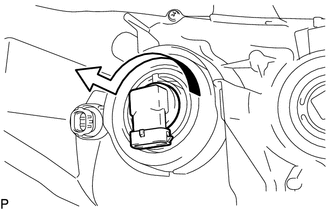
1. REMOVE NO. 1 HEADLIGHT BULB

(a) Turn the No. 1 headlight bulb in the direction indicated by the arrow in the illustration to remove it.

NOTICE:

Do not touch the No. 1 headlight bulb glass.

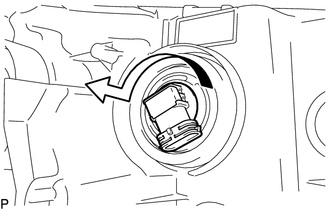
2. REMOVE NO. 2 HEADLIGHT BULB

(a) Turn the No. 2 headlight bulb in the direction indicated by the arrow in the illustration to remove it.

NOTICE:

Do not touch the No. 2 headlight bulb glass.

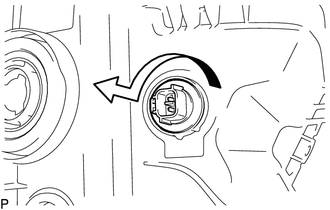
3. REMOVE FRONT TURN SIGNAL LIGHT BULB

(a) Turn the front turn signal light socket with front turn signal light bulb in the direction indicated by the arrow shown in the illustration to remove them.

(b) Remove the front turn signal light bulb from the front turn signal light socket.

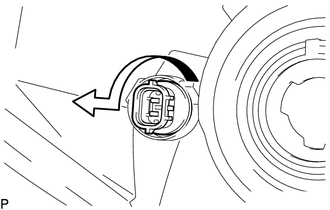
4. REMOVE CLEARANCE LIGHT BULB

(a) Turn the clearance light socket with clearance light bulb in the direction indicated by the arrow shown in the illustration to remove them.

(b) Remove the clearance light bulb from the clearance light socket.

Components
COMPONENTS ILLUSTRATION ILLUSTRATION ...

Removal
REMOVAL CAUTION / NOTICE / HINT HINT: Use the same procedure for both the LH and RH sides. The procedure described below is for the LH side. PROCEDURE 1. REMOVE FRONT BUMPER ASS ...

Other materials:

Front Camera Module Incorrect Axial Gap (C1AA8)
DESCRIPTION If the millimeter wave radar sensor assembly detects that the beam axis of the forward recognition camera is misaligned, it will store DTC C1AA8. DTC No. Detection Item DTC Detection Condition Trouble Area C1AA8 ...

Data List / Active Test
DATA LIST / ACTIVE TEST NOTICE: In the table below, the values listed under "Normal Condition" are reference values. Do not depend solely on these reference values when deciding whether a part is faulty or not. HINT: Using the Techstream to read the Data List allows the values or s ...

Basic audio operations
Basic audio operations and functions common to each mode are explained in this section. Operating the multimedia system 1. Press this button to eject a disc 2. Insert a disc into the disc slot 3.“Select Audio Source” screen appears 4. Turn this knob to select radio station bands, tracks ...

© 2011-2025 Copyright www.ttguide.net