DISASSEMBLY
PROCEDURE
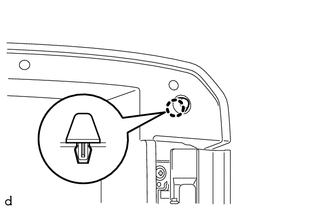
1. REMOVE CONSOLE COMPARTMENT DOOR CUSHION
HINT:
Use the same procedure as for the opposite side.
|
(a) Disengage the claw to remove the console compartment door cushion. |
|
2. REMOVE CONSOLE COMPARTMENT DOOR SUB-ASSEMBLY
|
(a) Remove the 2 screws. |
|
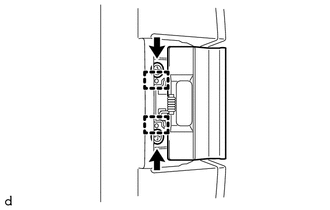
(b) Disengage the 2 guides to remove the console compartment door lock lever.
|
(c) Remove the 6 screws. Text in Illustration
|
|
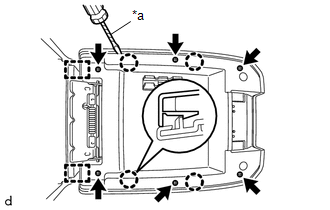
(d) Using a screwdriver with its tip wrapped in protective tape, disengage the 4 claws and 2 guides to remove the console compartment door sub-assembly.
3. REMOVE CONSOLE COMPARTMENT OUTER DOOR
|
(a) Remove the 4 screws. |
|
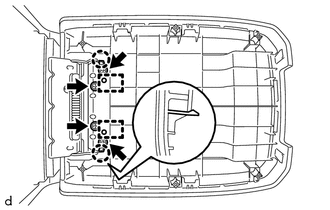
(b) Disengage the 2 claws and 2 guides to remove the console compartment outer door.
4. REMOVE CONSOLE COMPARTMENT DOOR HINGE SUB-ASSEMBLY
|
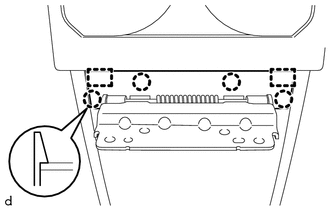
(a) Disengage the 4 claws and 2 guides to remove the console compartment door moulding cover. |
|
|
(b) Remove the 4 screws. |
|
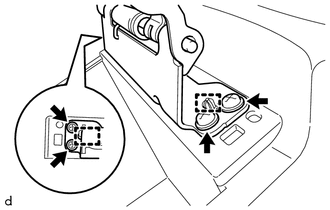
(c) Disengage the 2 guides to remove the console compartment door hinge sub-assembly.

