Components
COMPONENTS
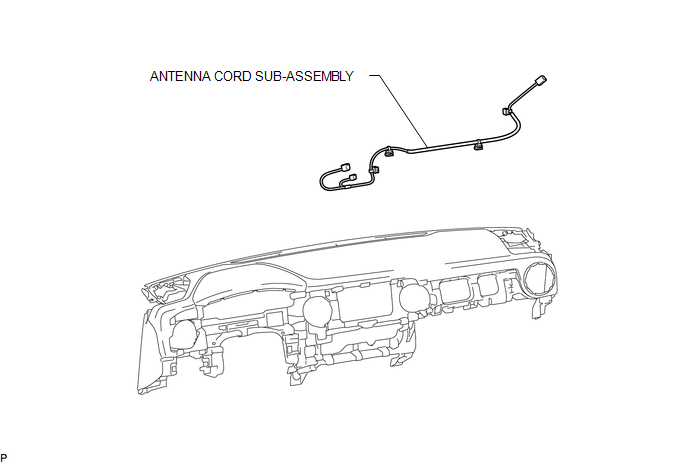
ILLUSTRATION
Removal
REMOVAL
PROCEDURE
1. REMOVE INSTRUMENT PANEL SUB-ASSEMBLY
(See page
)
2. REMOVE ANTENNA CORD SUB-ASSEMBLY
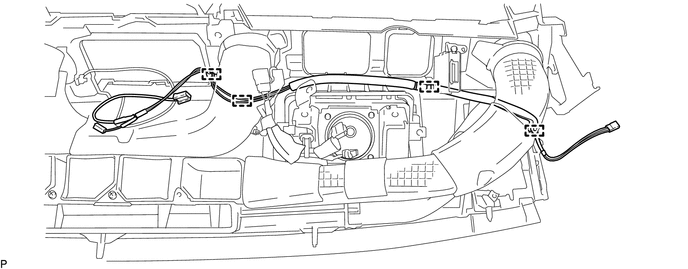
(a) Disengage the 4 clamps to remove the antenna cord sub-assembly.
Installation
INSTALLATION
PROCEDURE
1. INSTALL ANTENNA CORD SUB-ASSEMBLY
(a) Engage the 4 clamps to install the antenna cord sub-assembly.
2. INSTALL INSTRUMENT PANEL SUB-ASSEMBLY
(See page
)
Radio Antenna
Radio ReceiverInstallation
INSTALLATION
PROCEDURE
1. INSTALL FORWARD RECOGNITION CAMERA
NOTICE:
When replacing the forward recognition camera, replace it with a new
one.
Do not touch the camera lens. If the camera lens has been touched, do
not use the forward recognition camera.
If the forward reco ...
CD Sound Skips
PROCEDURE
1.
CHECK CD
(a) Check that the CD is not deformed or cracked.
OK:
No deformation or cracks on the CD
NG
CD IS FAULTY
OK
...
Sound of Portable Player cannot be Heard from Speakers or Sound is Low
PROCEDURE
1.
CHECK PORTABLE PLAYER SETTINGS
(a) Check the portable player settings.
(1) Check that the volume is not set to "0".
(2) Check that the mute is off.
(b) Check that the sound of the portable player can be heard from the speakers.
OK:
Sound ...