INSPECTION
PROCEDURE
1. INSPECT FRONT NO. 1 SPEAKER ASSEMBLY (w/o Amplifier Box Speaker Assembly)
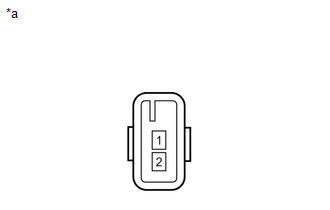
(a) Measure the resistance according to the value(s) in the table below.
Standard resistance:
|
Tester Connection |
Condition |
Specified Condition |
|---|---|---|
|
1 - 2 |
Always |
3.2 to 4.8 Ω |
If the result is not as specified, replace the front No. 1 speaker assembly.
Text in Illustration|
*a |
Component without harness connected (Front No. 1 Speaker Assembly) |
2. INSPECT FRONT NO. 1 SPEAKER ASSEMBLY (w/ Amplifier Box Speaker Assembly)
(a) Measure the resistance according to the value(s) in the table below.
Standard resistance:
|
Tester Connection |
Condition |
Specified Condition |
|---|---|---|
|
1 - 2 |
Always |
1.4 to 2.2 Ω |
If the result is not as specified, replace the front No. 1 speaker assembly.
Text in Illustration|
*a |
Component without harness connected (Front No. 1 Speaker Assembly) |
Removal
InstallationData Signal Circuit between Radio Receiver and Stereo Jack Adapter
DESCRIPTION
The No. 1 stereo jack adapter assembly sends the sound data signal or image data
signal from a USB device to the radio and display receiver assembly via this circuit.
WIRING DIAGRAM
PROCEDURE
1.
CHECK HARNESS AND CONNECTOR (RADIO AND DISPLAY RECEIVER ASSEMB ...
Wireless Door Lock Buzzer
Components
COMPONENTS
ILLUSTRATION
Removal
REMOVAL
PROCEDURE
1. REMOVE WIRELESS DOOR LOCK BUZZER
(a) Disconnect the connector.
(b) Using a clip remover, disengage the clamp to remove the wireless door lock
buzzer.
Installation
...
Installation
INSTALLATION
CAUTION / NOTICE / HINT
HINT:
The following procedures are for BD22 (w/o Differential Lock).
PROCEDURE
1. INSTALL DIFFERENTIAL CARRIER ASSEMBLY REAR
(a) Clean the contact surfaces of the rear differential carrier assembly and
axle housing.
(b) Install the rear differential carr ...