DISASSEMBLY
PROCEDURE
1. REMOVE STARTER YOKE ASSEMBLY
|
(a) Remove the nut and disconnect the lead wire from terminal C. |
|
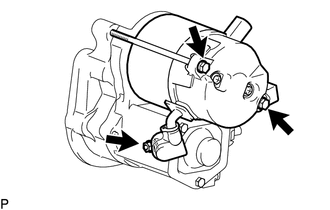
(b) Remove the 2 bolts.
(c) Pull out the starter yoke assembly and commutator end frame together with the starter armature assembly.
(d) Remove the O-ring from the starter yoke.
2. REMOVE MAGNET STARTER SWITCH ASSEMBLY
|
(a) Remove the 2 bolts and magnet starter switch assembly. |
|
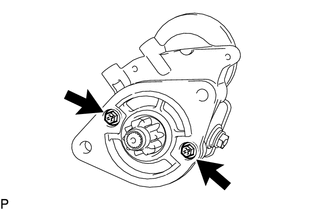
|
(b) Remove the idle gear, retainer, clutch roller, return spring and starter clutch sub-assembly from the starter drive housing assembly. Text in Illustration
|
|
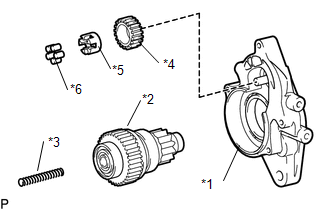
|
(c) Using a magnet hand, remove the steel ball from the starter clutch hole. Text in Illustration
|
|
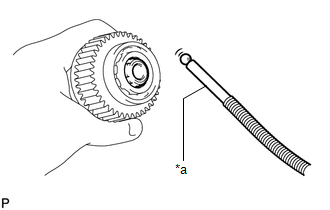
3. REMOVE STARTER BRUSH HOLDER ASSEMBLY
|
(a) Remove the 2 screws and commutator end frame from the starter yoke assembly. NOTICE: While holding down the lead wire, remove the commutator end frame. |
|
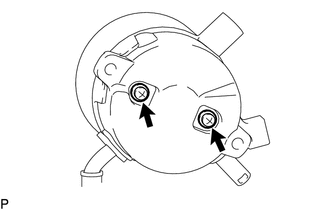
(b) Remove the O-ring from the starter yoke assembly.
|
(c) Disconnect the 4 brushes from the starter brush holder assembly. (1) Using a screwdriver, hold back the brush spring. (2) Disconnect the brush from the starter brush holder assembly. |
|

(d) Remove the starter brush holder assembly.
4. REMOVE STARTER ARMATURE ASSEMBLY
(a) Remove the starter armature assembly from the starter yoke assembly.