
Toyota Tacoma (2015-2018) Service Manual: Washer Nozzle
Components
COMPONENTS
ILLUSTRATION
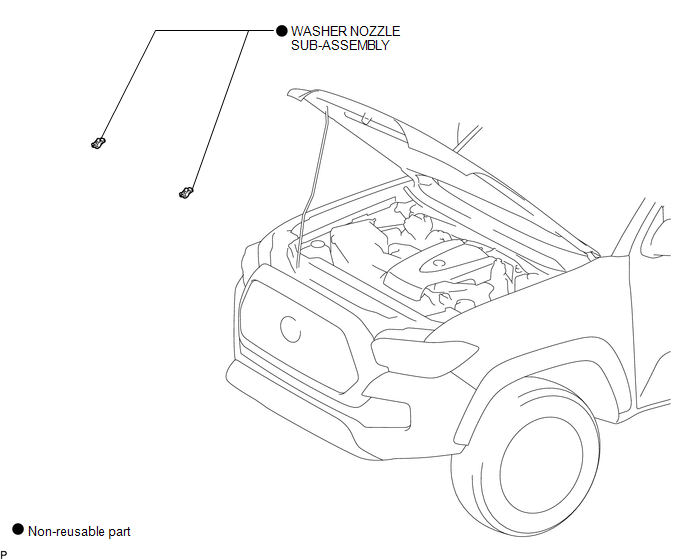
On-vehicle Inspection
ON-VEHICLE INSPECTION
PROCEDURE
1. INSPECT WASHER NOZZLE SUB-ASSEMBLY
(a) Operate the washer nozzle sub-assembly and check the position that the washer fluid hits the windshield.
Standard:
Washer fluid hits the windshield glass in the areas shown in the illustration.
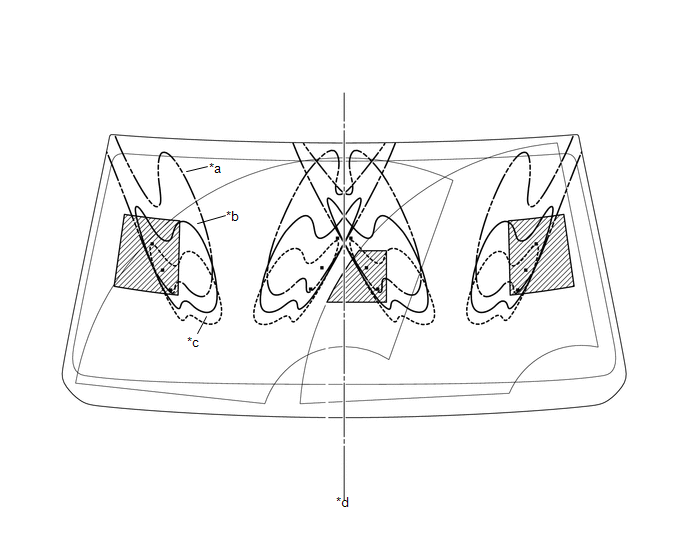 Text in Illustration
|
*a |
Upper Limit |
*b |
Standard |
|
*c |
Lower Limit |
*d |
Vehicle center line |
.png) |
Reference |
- |
- |
HINT:
If the result is not as specified, replace the washer nozzle sub-assembly.
Adjustment
ADJUSTMENT
PROCEDURE
1. REMOVE WASHER NOZZLE SUB-ASSEMBLY
.gif)
2. ADJUST WASHER NOZZLE SUB-ASSEMBLY
(a) Select a washer nozzle so that the contact area is within the standard. Replace the washer nozzle with the selected one.
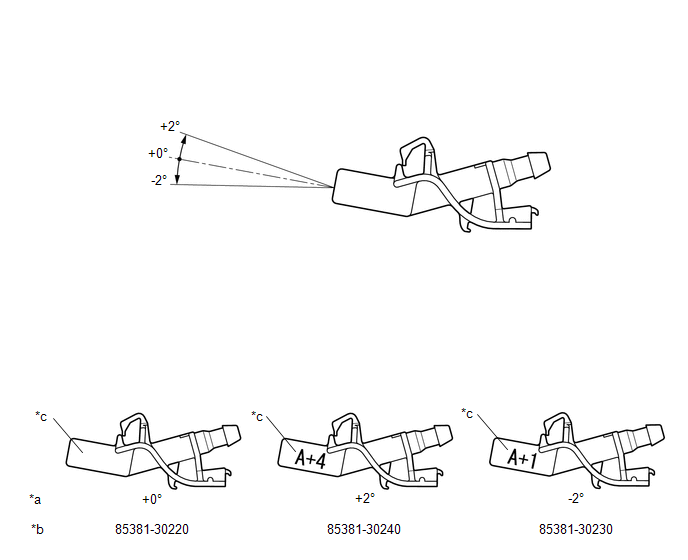 Text in Illustration
|
*a |
Washer Fluid Spray Angle |
*b |
Part Number |
|
*c |
Identification Mark |
- |
- |
3. INSTALL WASHER NOZZLE SUB-ASSEMBLY
Installation
INSTALLATION
PROCEDURE
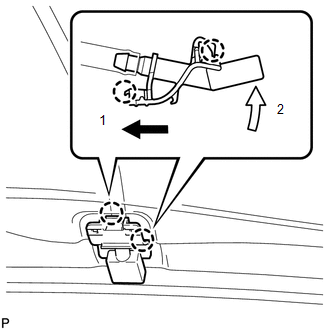
1. INSTALL WASHER NOZZLE SUB-ASSEMBLY
(a) Connect a new washer nozzle sub-assembly to the washer hose.
|
(b) Engage the 2 claws to install the washer nozzle sub-assembly as shown in the illustration. |
|
2. INSPECT WASHER NOZZLE SUB-ASSEMBLY
.gif)
3. ADJUST WASHER NOZZLE SUB-ASSEMBLY
Removal
REMOVAL
PROCEDURE
1. REMOVE WASHER NOZZLE SUB-ASSEMBLY
HINT:
Use the same procedure for both sides.
|
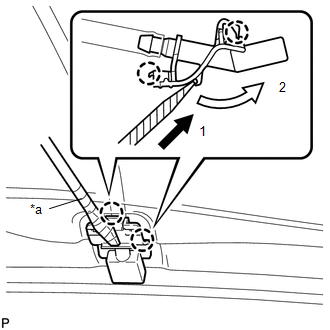
(a) Using a screwdriver with its tip wrapped in protective tape, disengage the 2 claws to separate the washer nozzle sub-assembly as shown in the illustration. Text in Illustration
NOTICE: Do not damage the windshield glass. |
|
|
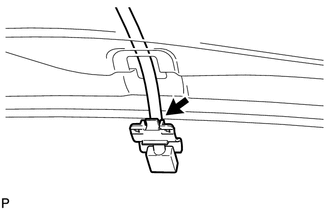
(b) Remove the washer nozzle sub-assembly from the washer hose. NOTICE: Washer nozzle sub-assembly cannot be reused. |
|
 Washer Motor
Components
COMPONENTS
ILLUSTRATION
On-vehicle Inspection
ON-VEHICLE INSPECTION
PROCEDURE
1. INSPECT WINDSHIELD WASHER MOTOR AND PUMP ASSEMBLY
HINT:
This check should be performed with th ...

Other materials:
Parts Location
PARTS LOCATION
ILLUSTRATION
*A
for Double Cab
*B
for Access Cab
*C
w/ Back Door Power Window
-
-
*1
NO. 1 BACK PANEL PELAY
*2
NO. 2 BACK PANEL RELAY
...
Transponder Chip Malfunction (B2793,B2794,B2797,B2798)
DESCRIPTION
DTC B2793 is stored when a malfunction is found in the key during key
code registration or a key code is not registered normally. Replace the
key if key code registration cannot be performed normally and this DTC is
output.
DTC B2794 is stored when a key with an i ...
Installation
INSTALLATION
PROCEDURE
1. SET NO. 1 CYLINDER TO TDC/COMPRESSION
2. INSTALL CAMSHAFT TIMING GEAR BOLT
NOTICE:
There are different types of camshaft timing gear bolts. Make sure to check the
identification mark to determine the tightening torque.
*a
Identification Ma ...
