Components
COMPONENTS
ILLUSTRATION
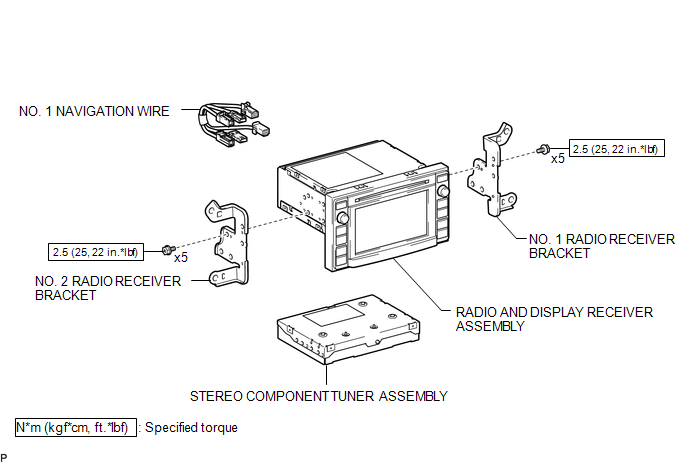
Removal
REMOVAL
PROCEDURE
1. REMOVE RADIO AND DISPLAY RECEIVER ASSEMBLY WITH BRACKET
(See page .gif) )
)
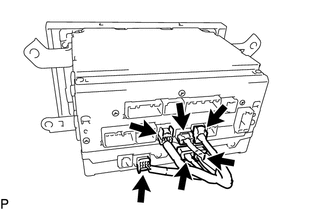
2. REMOVE NO. 1 NAVIGATION WIRE
|
(a) Disconnect the 6 connectors to remove the No. 1 navigation wire. |
|
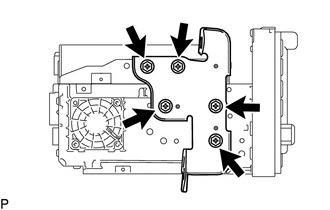
3. REMOVE NO. 1 RADIO RECEIVER BRACKET
|
(a) Remove the 5 bolts and No. 1 radio receiver bracket. |
|
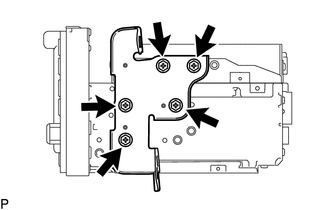
4. REMOVE NO. 2 RADIO RECEIVER BRACKET
|
(a) Remove the 5 bolts and No. 2 radio receiver bracket. |
|
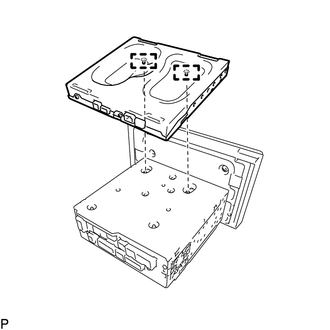
5. REMOVE STEREO COMPONENT TUNER ASSEMBLY
|
(a) Disengage the 2 guides to remove the stereo component tuner assembly as shown in the illustration. |
|
Installation
INSTALLATION
PROCEDURE
1. INSTALL STEREO COMPONENT TUNER ASSEMBLY
(a) Engage the 2 guides to install the stereo component tuner assembly.
2. INSTALL NO. 2 RADIO RECEIVER BRACKET
(a) Install the No. 2 radio receiver bracket with the 5 bolts.
Torque:
2.5 N·m {25 kgf·cm, 22 in·lbf}
3. INSTALL NO. 1 RADIO RECEIVER BRACKET
(a) Install the No. 1 radio receiver bracket with the 5 bolts.
Torque:
2.5 N·m {25 kgf·cm, 22 in·lbf}
4. INSTALL NO. 1 NAVIGATION WIRE
(a) Connect the 6 connectors to install the No. 1 navigation wire.
5. INSTALL RADIO AND DISPLAY RECEIVER ASSEMBLY WITH BRACKET
(See page .gif) )
)

