REMOVAL
CAUTION / NOTICE / HINT
NOTICE:
- When replacing the forward recognition camera, replace it with a new one.
- Do not touch the camera lens or the front windshield glass in front of the camera.
- If the forward recognition camera has been struck or dropped, replace it with a new one.
- When replacing the windshield glass of a vehicle equipped with a forward recognition camera, make sure to use a Toyota genuine part. If a non-Toyota genuine part is used, the forward recognition camera may not be able to be installed due to a missing bracket. Also, the dynamic radar cruise control system, forward recognition camera system, lane departure alert system, pre-collision system may not operate properly due to a difference in the transmissivity or black ceramic border.
- Do not touch the internal components of the forward recognition with heater hood sub-assembly or press on the heater when working on the forward recognition with heater hood sub-assembly.
PROCEDURE
1. REMOVE NO. 1 FORWARD RECOGNITION COVER
|
(a) Disengage the 2 clips and 2 guides to remove the No. 1 forward recognition cover as shown in the illustration. NOTICE: When removing, press the cover parallel to the windshield glass surface and remove. |
|
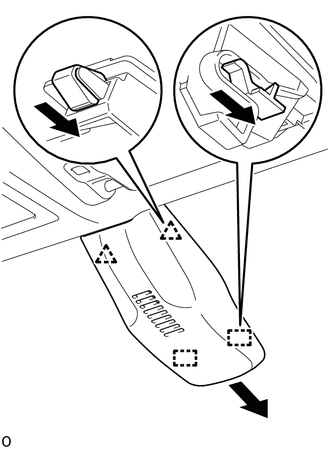
2. REMOVE FORWARD RECOGNITION LATCH
|
(a) Disengage the 2 claws in the direction indicated by the arrow (1) in the illustration. |
|
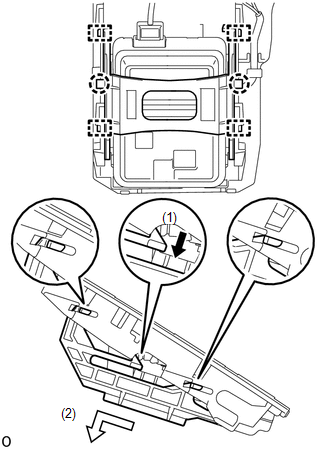
(b) Disengage the 4 guides in the direction indicated by the arrow (2) in the illustration to remove the forward recognition latch.
3. REMOVE FORWARD RECOGNITION CAMERA
NOTICE:
If the forward recognition camera has been struck or dropped, replace it with a new one.
|
(a) Disconnect the connector. NOTICE: Do not pull the harness forcibly when disconnecting the connector. |
|
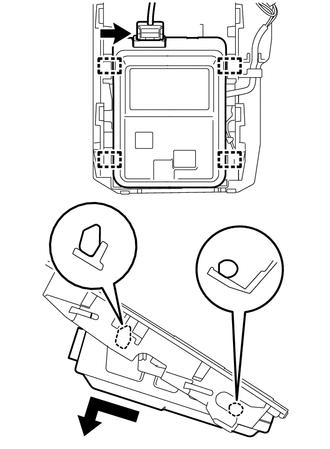
(b) Disengage the 4 guides to remove the forward recognition camera as shown in the illustration.
NOTICE:
- Do not apply excessive force.
- If the forward recognition camera bracket is deformed or damaged, replace it together with the windshield glass.