
Toyota Tacoma (2015-2018) Service Manual: Operation Check
OPERATION CHECK
1. CHECK WINDOW LOCK FUNCTION
(a) Turn the ignition switch ON.
(b) Press the window lock switch of the power window regulator master switch assembly.
HINT:
The illumination (LED) built into the switch knob of each seat does not turn off.
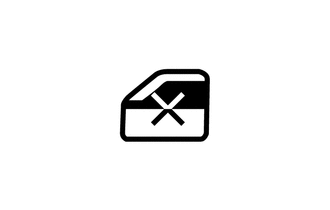
(c) Check that the power window for each seat except the driver seat can no longer be operated.
(d) When the window lock switch is pressed again, check that the power window for each seat except the driver seat can be operated.
2. CHECK MANUAL UP / DOWN FUNCTION
(a) Check that the driver door power window operates as follows:
|
Condition |
Master Switch |
Switch Operation |
Power Window |
|---|---|---|---|
|
Ignition switch ON |
Driver door |
Pulled up |
UP (Closes) |
|
Pushed halfway down |
DOWN (Opens) |
(b) Check that the front passenger door window and rear power windows operate as follows:
|
Condition |
Regulator Switch |
Switch Operation |
Power Window |
|---|---|---|---|
|
Front passenger door |
Pulled up |
UP (Closes) |
|
Pushed down |
DOWN (Opens) |
||
|
Rear LH door*1 |
Pulled up |
UP (Closes) |
|
|
Pushed down |
DOWN (Opens) |
||
|
Rear RH door*1 |
Pulled up |
UP (Closes) |
|
|
Pushed down |
DOWN (Opens) |
- *1: for Double Cab
(c) Check that the power window (for back door power window)* operates as follows:
|
Condition |
Regulator Switch |
Switch Operation |
Power Window |
|---|---|---|---|
|
Ignition switch ON |
Back Door |
Pulled up |
Closes |
|
Pushed down |
Opens |
- *: w/ Back Door Power Window
3. CHECK AUTO DOWN FUNCTION
(a) Check that the driver door power window operates as follows:
|
Condition |
Master Switch |
Switch Operation |
Power Window |
|---|---|---|---|
|
Driver door |
Pushed down (One touch operation) |
AUTO DOWN (Opens) |
4. CHECK REMOTE MANUAL UP / DOWN FUNCTION
(a) Check that the front passenger door window and rear power windows operate as follows:
|
Condition |
Master Switch |
Switch Operation |
Power Window |
|---|---|---|---|
|
Ignition switch ON |
Front passenger door |
Pulled up |
UP (Closes) |
|
Pushed down |
DOWN (Opens) |
||
|
Rear LH door*1 |
Pulled up |
UP (Closes) |
|
|
Pushed down |
DOWN (Opens) |
||
|
Rear RH door*1 |
Pulled up |
UP (Closes) |
|
|
Pushed down |
DOWN (Opens) |
- *1: for Double Cab
5. CHECK POWER WINDOW SWITCH LED ILLUMINATION
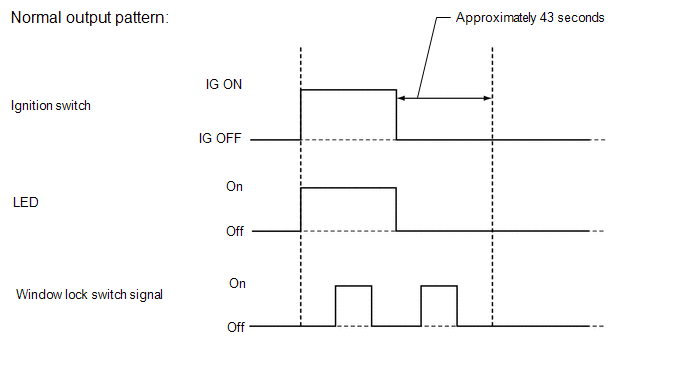
(a) When the ignition switch is turned from off to ON with the connectors connected, check that the illumination (LED) on the switch portion of the power window regulator switch assembly turns on.
 System Diagram
SYSTEM DIAGRAM
...
 Problem Symptoms Table
PROBLEM SYMPTOMS TABLE
HINT:
Use the table below to help determine the cause of problem symptoms.
If multiple suspected areas are listed, the potential causes of the symptoms
are lis ...
Other materials:
Skid Control Buzzer Circuit (C1A4A)
DESCRIPTION
Based on dynamic radar cruise control system operation, the forward recognition
camera provides warnings to the driver by sounding the skid control buzzer.
DTC C1A4A is stored when a malfunction is detected in the skid control buzzer
circuit.
DTC No.
Detectio ...
Transmission Fluid Temperature Sensor "B" Circuit Low Input (P2742,P2743)
DESCRIPTION
The No. 2 ATF temperature sensor is installed in the transmission valve body
assembly.
If the ECM detects an abnormally high ATF temperature near this sensor, it illuminates
the warning indicator.
HINT:
The temperature of ATF easily rises when towing, climbing hills, in
...
Diagnostic Trouble Code Chart
DIAGNOSTIC TROUBLE CODE CHART
Steering Lock System
DTC Code
Detection Item
See page
B2781
Open / Short in Steering Lock ECU
B2782
Power Source Control ECU Malfunction
...
