
Toyota Tacoma (2015-2018) Service Manual: Open in Pump Motor Circuit (C1251)
DESCRIPTION
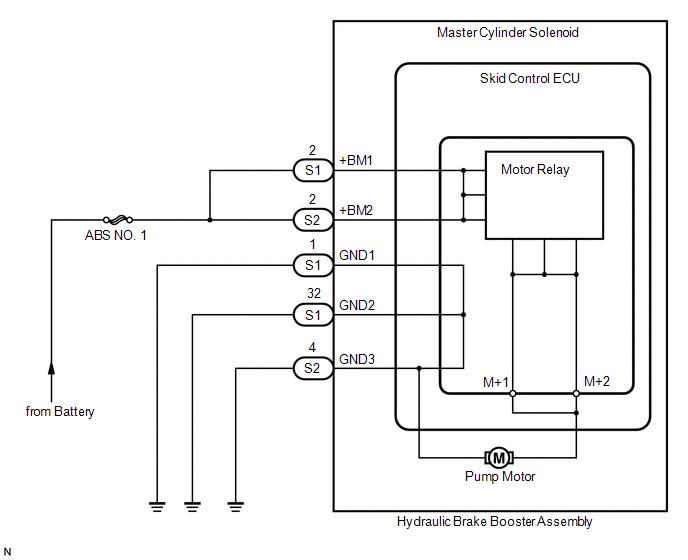
The motor relay (semiconductor relay) is built into the master cylinder solenoid and drives the pump motor based on a signal from the skid control ECU (master cylinder solenoid).
|
DTC No. |
DTC Detecting Condition |
Trouble Areas |
|---|---|---|
|
C1251 |
Open in motor system circuit (motor input circuit) |
Hydraulic brake booster pump motor circuit |
WIRING DIAGRAM
CAUTION / NOTICE / HINT
HINT:
Remove the hydraulic brake booster before the inspection (See page
.gif) ).
).
PROCEDURE
|
1. |
CHECK BRAKE PUMP MOTOR WIRE HARNESS CONNECTION (MT+ / MT-) |
(a) Using a screwdriver, remove the 2 plugs from the hydraulic brake booster
(See page ).
(b) Check the tightening torque of 2 screws which fasten the wire harness connecting
hydraulic brake booster and brake booster pump (See page
).
Torque:
2.9 N·m {30 kgf·cm, 26 in·lbf}
| NG | .gif) |
RETIGHTEN SCREWS |
|
.gif)
|
2. |
CHECK RESISTANCE OF PUMP MOTOR WIRE HARNESS (MT+/MT-) |
|
(a) Using a screwdriver, remove the 2 screws and pull the wire harness from the hydraulic brake booster. |
|
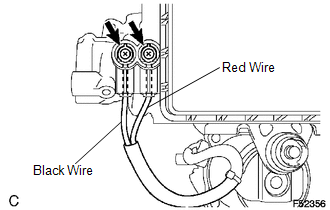
(b) Measure the resistance between the red wire (MT+) and black wire (MT-).
Resistance:
2 Ω
| NG | |
REPLACE HYDRAULIC BRAKE BOOSTER |
|
|
3. |
RECONFIRM DTC |
(a) Reassemble the hydraulic brake booster, then reinstall the hydraulic brake booster.
(b) Clear the DTCs (See page
).
(c) Check if the same DTCs are detected.
|
Result |
Proceed to |
|---|---|
|
DTC output |
A |
|
DTC not output |
B |
| A | |
REPLACE MASTER CYLINDER SOLENOID |
| B | |
END |
 Open Circuit in IG1/IG2 Power Source Circuit (C1242)
DESCRIPTION
If there is a problem with the skid control ECU (master cylinder solenoid) power
supply circuit, the skid control ECU outputs the DTC and prohibits operation under
the fail safe funct ...
 Brake Booster Pump Motor on Time Abnormally Long (C1252)
DESCRIPTION
The motor relay (semiconductor relay) is built into the master cylinder solenoid
and drives the pump motor based on a signal from the skid control ECU (master cylinder
solenoid).
...
Other materials:
Installation
INSTALLATION
PROCEDURE
1. INSTALL FRONT BUMPER ASSEMBLY
(a) w/ Fog Light:
(1) Connect the 2 connectors.
(b) Engage the 3 claws and guide to install the front bumper assembly.
(c) Remove the protective tape.
(d) Install the 6 clips.
(e) Engage the clamp.
(f) Connect the connector.
(g) Insta ...
Transmission Fluid Temperature Sensor "B" Circuit Short to Ground (P274011)
DESCRIPTION
The No. 2 ATF temperature sensor is installed in the transmission valve body
assembly.
If the ECM detects an abnormally high ATF temperature near this sensor, it illuminates
the warning indicator.
HINT:
The temperature of ATF easily rises when towing, climbing hills, in
...
Vsc Off Switch
Components
COMPONENTS
ILLUSTRATION
Inspection
INSPECTION
PROCEDURE
1. INSPECT VSC OFF SWITCH
(a) Check the resistance.
(1) Measure the resistance according to the value(s) in the table below.
Text in Illustration
*a
Component without h ...
