ON-VEHICLE INSPECTION
PROCEDURE
1. CHECK FUEL PUMP ASSEMBLY OPERATION
(a) Check fuel pressure.
(1) Connect the Techstream to the DLC3.
(2) Start the engine.
(3) Turn the Techstream on.
(4) Enter the following menus: Powertrain / Engine / Active Test / Control the Target Fuel Pressure.
(5) Check that the fuel pressure fluctuates when the target fuel pressure changes.
HINT:
The target fuel pressure operation lowers the target fuel pressure by 12.5% or increases the target fuel pressure by 25%.
Standard:
Fuel pressure fluctuates in accordance with the Techstream operation.
If the result is not as specified, replace the fuel delivery pipe sub-assembly (fuel pressure sensor).
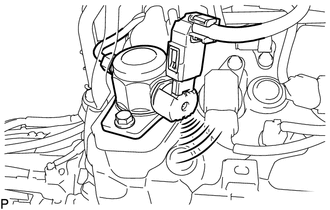
(b) Check operating sound.
(1) Remove the V-bank cover sub-assembly (See page
.gif) ).
).
(2) Start the engine.
|
(3) Using a sound scope, check the operating sound of the pump. If no sound can be heard, check the fuel pump, wire harness and ECM. |
|
(4) Stop the engine.
(5) Install the V-bank cover sub-assembly (See page
).