The Bluetooth® audio system enables the user to enjoy music played on a portable player from the vehicle speakers via wireless communication.
Select “ Audio� on the “Select Audio Source� screen.
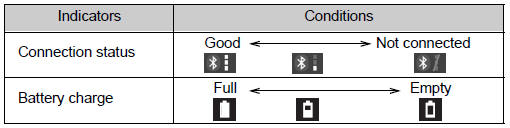
When a Bluetooth® device cannot be connected, check the connection status on the “Bluetooth Audio� screen. If the device is not connected, either register or reconnect the device.
Audio control screen
Some titles and controls may not be displayed depending on the type of portable audio player used.
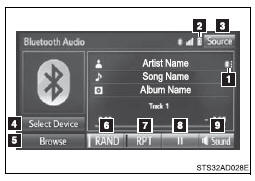
 Connection status
 Battery charge
 “Select Audio Source� screen appears
 Selecting a Bluetooth® device
 Select to display the play mode
selection screen
Select to display the play mode
selection screen
 Random playback
 Repeat play
 Pause
Pause
Select  to resume play
 Setting the sound