
Toyota Tacoma (2015-2018) Service Manual: Front Crankshaft Oil Seal
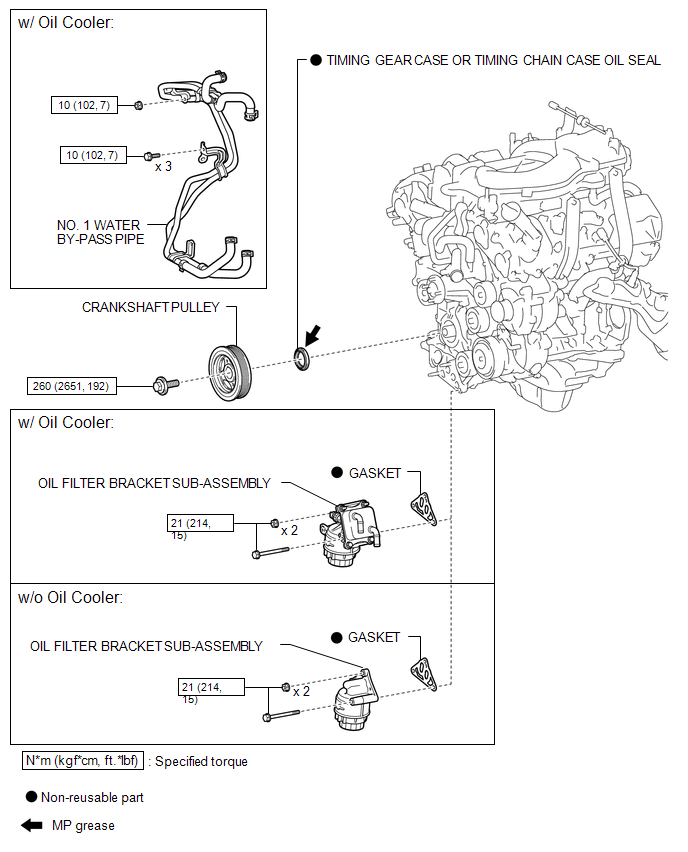
Components
COMPONENTS
ILLUSTRATION
Installation
INSTALLATION
PROCEDURE
1. INSTALL TIMING GEAR CASE OR TIMING CHAIN CASE OIL SEAL
(a) Apply MP grease to the lip of a new timing gear case or timing chain case oil seal.
|
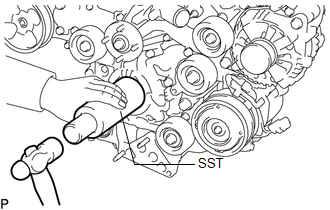
(b) Using SST and a hammer, tap in the timing gear case or timing chain case oil seal until its surface is flush with the timing chain cover edge. SST: 09226-10010 NOTICE:
|
|
2. INSTALL CRANKSHAFT PULLEY
.gif)
3. INSTALL OIL FILTER BRACKET SUB-ASSEMBLY (w/ Oil Cooler)
4. INSTALL OIL FILTER BRACKET SUB-ASSEMBLY (w/o Oil Cooler)
5. CONNECT NO. 1 WATER BY-PASS PIPE (w/ Oil Cooler)
6. INSTALL RADIATOR ASSEMBLY
(See page )
Removal
REMOVAL
PROCEDURE
1. REMOVE RADIATOR ASSEMBLY
(See page .gif) )
)
2. DISCONNECT NO. 1 WATER BY-PASS PIPE (w/ Oil Cooler)
3. REMOVE OIL FILTER BRACKET SUB-ASSEMBLY (w/ Oil Cooler)
4. REMOVE OIL FILTER BRACKET SUB-ASSEMBLY (w/o Oil Cooler)
5. REMOVE CRANKSHAFT PULLEY
6. REMOVE TIMING GEAR CASE OR TIMING CHAIN CASE OIL SEAL
|
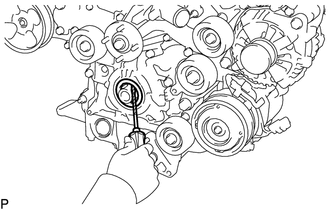
(a) Using a screwdriver, pry out the timing gear case or timing chain case oil seal. NOTICE: Do not damage the surface of the oil seal press fit hole or crankshaft. HINT: Tape the screwdriver tip before use. |
|
 Installation
INSTALLATION
PROCEDURE
1. INSTALL ENGINE COOLANT TEMPERATURE SENSOR
2. INSTALL ENGINE OIL PRESSURE SWITCH ASSEMBLY
3. INSTALL IGNITION COIL ASSEMBLY
4. INSTALL FUEL INJECTOR SEAL
5. ...

Other materials:
Oil Pressure Switch
Components
COMPONENTS
ILLUSTRATION
Removal
REMOVAL
PROCEDURE
1. REMOVE ENGINE OIL PRESSURE SWITCH ASSEMBLY
(a) Disengage the clamp and disconnect the engine oil pressure switch
connector.
(b) Using a 24 mm deep socket ...
Event data recorder
This vehicle is equipped with an event data recorder (EDR). The main purpose
of an EDR is to record, in certain crash or near crash-like situations, such as
an air bag deployment or hitting a road obstacle, data that will assist in understanding
how a vehicle’s systems performed. The EDR is ...
Multi-terrain Select Switch
Components
COMPONENTS
ILLUSTRATION
Removal
REMOVAL
PROCEDURE
1. REMOVE MULTI-TERRAIN SELECT SWITCH (DRIVE MONITOR SWITCH)
(a) Disengage the 2 claws to remove the multi-terrain select switch (drive
monitor switch).
Inspection ...
