Components
COMPONENTS
ILLUSTRATION
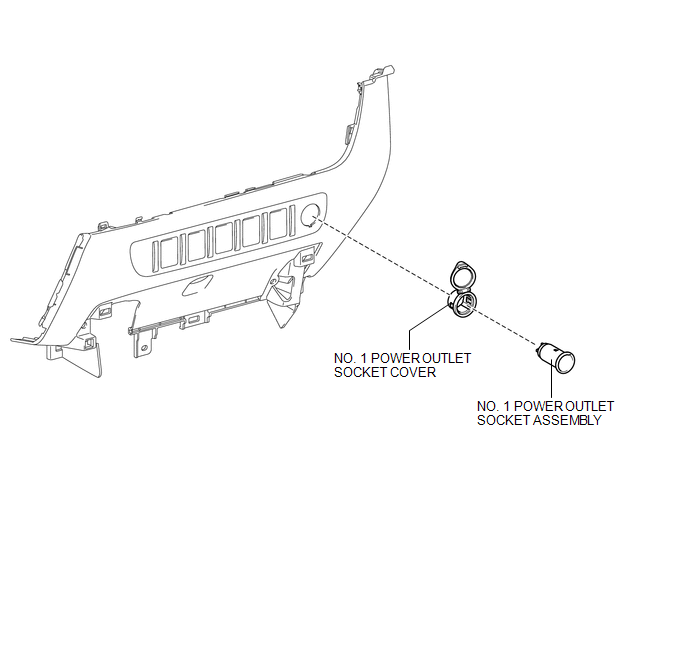
Removal
REMOVAL
PROCEDURE
1. REMOVE INSTRUMENT PANEL LOWER CENTER FINISH PANEL
(See page
)
2. REMOVE NO. 1 POWER OUTLET SOCKET ASSEMBLY
|
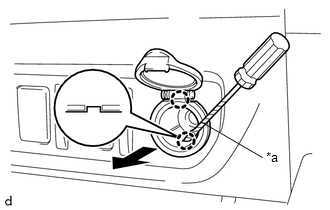
(a) Using a screwdriver with its tip wrapped in protective tape, disengage the 2 claws to remove the No. 1 power outlet socket assembly as shown in the illustration. Text in Illustration
|
|
3. REMOVE NO. 1 POWER OUTLET SOCKET COVER
|
(a) Disengage the 2 claws to remove the No. 1 power outlet socket cover. |
|
Installation
INSTALLATION
PROCEDURE
1. INSTALL NO. 1 POWER OUTLET SOCKET COVER
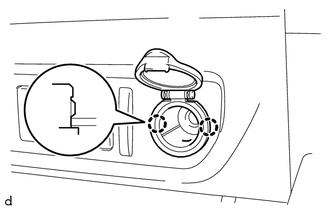
(a) Engage the 2 claws to install the No. 1 power outlet socket cover.
2. INSTALL NO. 1 POWER OUTLET SOCKET ASSEMBLY
|
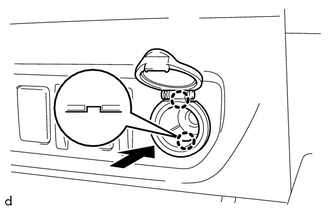
(a) Engage the 2 claws to install the No. 1 power outlet socket assembly as shown in the illustration. |
|
3. INSTALL INSTRUMENT PANEL LOWER CENTER FINISH PANEL
(See page
)
Inverter Relay
Power Outlet Socket(for Rear Side)Diagnosis System
DIAGNOSIS SYSTEM
CHECK DLC3
(a) Check the DLC3.
Click here
FUNCTION OF WARNING INDICATOR AND MESSAGE
(a) If the lane departure alert system is not functioning properly, the driver
is warned by the lane departure alert indicator and multi-information display warning
message on the combinat ...
Abnormal Change in Output Signal of Rear Speed Sensor RH (Test Mode DTC) (C1277,...,C1416)
DESCRIPTION
Refer to DTCs C1401 and C1402 (See page ).
DTC Code
DTC Detection Condition
Trouble Area
C1277
C1278
Stored only during test mode.
Rear speed sensor RH/LH
Rear speed sensor rotor RH/LH (Rear ax ...
CD cannot be Ejected
PROCEDURE
1.
CHECK OPERATION
(a) Press the disc eject switch of the navigation receiver assembly for 5 seconds
or more and check that the CD is ejected.
OK:
CD is ejected.
NG
REPLACE NAVIGATION RECEIVER ASSEMBLY
...