Toyota Tacoma manuals

Toyota Tacoma (2015-2018) Service Manual: Front Speed Sensor

Removal

REMOVAL

PROCEDURE

1. PRECAUTION

NOTICE:

After turning the ignition switch off, waiting time may be required before disconnecting the cable from the negative (-) battery terminal.

Therefore, make sure to read the disconnecting the cable from the negative (-) battery terminal notices before proceeding with work.

Click here 2. DISCONNECT CABLE FROM NEGATIVE BATTERY TERMINAL

2. DISCONNECT CABLE FROM NEGATIVE BATTERY TERMINAL

NOTICE:

When disconnecting the cable, some systems need to be initialized after the cable is reconnected.

Click here 3. REMOVE FRONT WHEEL

3. REMOVE FRONT WHEEL

4. REMOVE FRONT SPEED SENSOR
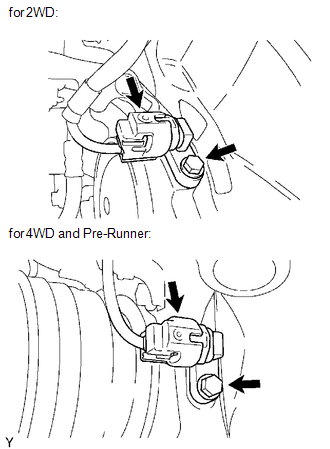
(a) Disconnect the speed sensor connector.

(a) Disconnect the speed sensor connector.

(b) Remove the bolt and front speed sensor.

NOTICE:

  • Do not attach any foreign matter to the sensor tip.
  • Ensure that no foreign matter enters the sensor installation part.

Installation

INSTALLATION

PROCEDURE

1. INSTALL FRONT SPEED SENSOR

(a) Install the front speed sensor with the bolt.

Torque:

8.3 N·m {85 kgf·cm, 73 in·lbf}

NOTICE:

Make sure that the sensor tip is clean.

(b) Connect the speed sensor connector.

2. INSTALL FRONT WHEEL

Torque:

113 N·m {1152 kgf·cm, 83 ft·lbf}

3. CONNECT CABLE TO NEGATIVE BATTERY TERMINAL

Torque:

5.4 N·m {55 kgf·cm, 48 in·lbf}

NOTICE:

When disconnecting the cable, some systems need to be initialized after the cable is reconnected.

Click here 4. CHECK VSC SENSOR SIGNAL (for Hydraulic Brake Booster)

4. CHECK VSC SENSOR SIGNAL (for Hydraulic Brake Booster)

Click here 5. CHECK VSC SENSOR SIGNAL (for Vacuum Brake Booster)

5. CHECK VSC SENSOR SIGNAL (for Vacuum Brake Booster)

Click here Multi-terrain Select Switch

Crawl Switch
Components COMPONENTS ILLUSTRATION Inspection INSPECTION PROCEDURE 1. INSPECT CRAWL CONTROL SWITCH (DRIVE MONITOR SWITCH) (a) Check the resistance. (1) Measure the resistance according t ...

Multi-terrain Select Switch
Components COMPONENTS ILLUSTRATION Removal REMOVAL PROCEDURE 1. REMOVE MULTI-TERRAIN SELECT SWITCH (DRIVE MONITOR SWITCH) (a) Disengage the 2 claws to remove the multi-terrain ...

Other materials:

Transfer System
Precaution PRECAUTION Before disassembly, clean the transfer assembly and remove any deposited sand and mud to prevent it from entering the transfer during disassembly and assembly. When removing any light alloy parts such as the transfer covers, do not pry them off with a ...

Diagnostic Trouble Code Chart
DIAGNOSTIC TROUBLE CODE CHART Charging System DTC Code Detection Item Warning Indicate Memory SAE See page P161A87 Lost Communication with Alternator Missing Message - DTC stored ...

USB port/AUX port
Connect an iPod, USB memory device or portable audio player to the USB port/AUX port as indicated below. Select “iPod”, “USB” or “AUX” on the “Select Audio Source” screen and the device can be operated via multimedia system. Connecting using the USB port/AUX port ■ iPod ...

© 2011-2026 Copyright www.ttguide.net