Components
COMPONENTS
ILLUSTRATION
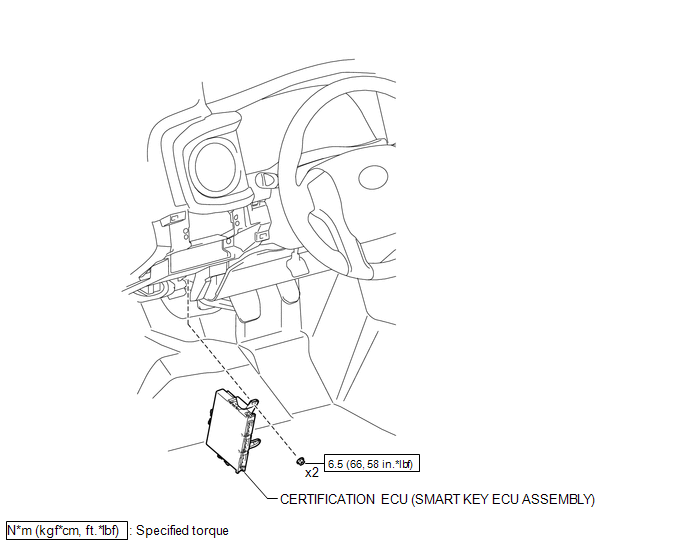
Installation
INSTALLATION
PROCEDURE
1. INSTALL CERTIFICATION ECU (SMART KEY ECU ASSEMBLY)
(a) Install the certification ECU (smart key ECU assembly) with the 2 nuts.
Torque:
6.5 N·m {66 kgf·cm, 58 in·lbf}
(b) Engage the clamp to install the wire harness.
(c) Connect the 3 connectors.
2. INSTALL INSTRUMENT PANEL LOWER FINISH PANEL SUB-ASSEMBLY
(See page
)
Removal
REMOVAL
PROCEDURE
1. REMOVE INSTRUMENT PANEL LOWER FINISH PANEL SUB-ASSEMBLY
(See page
)
2. REMOVE CERTIFICATION ECU (SMART KEY ECU ASSEMBLY)
|
(a) Disconnect the 3 connectors. |
|
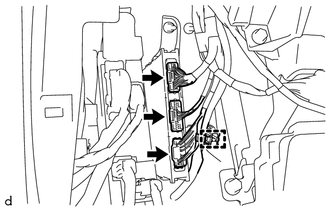
(b) Disengage the clamp to separate the wire harness.
|
(c) Remove the 2 nuts and certification ECU (smart key ECU assembly). |
|
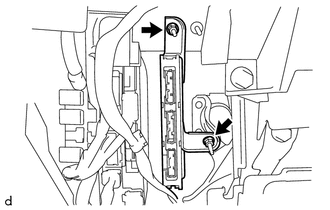
Precaution
PRECAUTION
1. The navigation system uses an SD card containing data such as map data.
Text in Illustration
*a
SD Card
2. Precaution for removing the SD card
NOTICE:
The SD card contains map data and various programs for the navigation
system.
With ...
Indicators and warning lights
The indicator and warning lights on the instrument cluster and center panel
inform the driver of the status of the vehicle’s various systems.
Instrument cluster
Center panel
■ Indicators
The indicators inform the driver of the operating state of the vehicle’s various
systems. ...
Four-wheel drive system
Use the front-wheel drive control switch to select the following transfer modes.
H2 (high speed position, two-wheel
drive)
Use this for normal driving on dry hard-surfaced roads.
This position gives greater economy, quietest ride and least wear.
H4 (high speed position, four-wheel
drive) ...