Toyota Tacoma manuals

Toyota Tacoma (2015-2018) Service Manual: Blind Spot Monitor Main Switch

Components

COMPONENTS

ILLUSTRATION
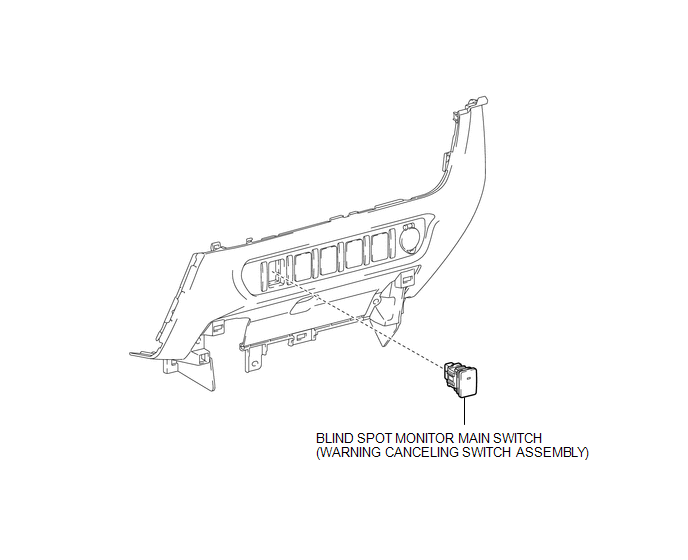
Removal

Removal

REMOVAL

PROCEDURE

1. REMOVE INSTRUMENT PANEL LOWER CENTER FINISH PANEL

(See page 2. REMOVE BLIND SPOT MONITOR MAIN SWITCH (WARNING CANCELING SWITCH ASSEMBLY) )

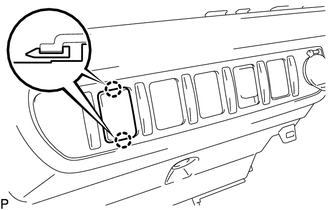
2. REMOVE BLIND SPOT MONITOR MAIN SWITCH (WARNING CANCELING SWITCH ASSEMBLY)

(a) Disengage the 2 claws to remove the blind spot monitor main switch (warning canceling switch assembly).

Inspection

INSPECTION

PROCEDURE

1. INSPECT BLIND SPOT MONITOR MAIN SWITCH (WARNING CANCELING SWITCH ASSEMBLY)

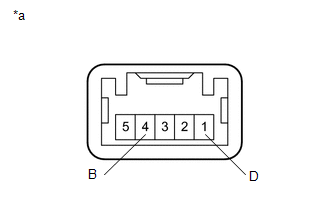
(a) Measure the resistance according to the value(s) in the table below.

Text in Illustration

*a

Component without harness connected

(Blind Spot Monitor Main Switch (Warning Canceling Switch Assembly))

Standard Resistance:

Tester Connection

Switch Condition

Specified Condition

4 (B) - 1 (D)

Blind spot monitor main switch on

Below 1 Ω

Blind spot monitor main switch off

10 kΩ or higher

If the result is not as specified, replace the blind spot monitor main switch (warning canceling switch assembly).

(b) Check that the switch illuminates.

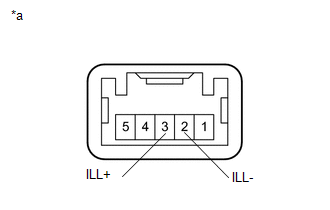
(1) Apply battery voltage to the blind spot monitor main switch (warning canceling switch assembly) and check that the switch illuminates.

Text in Illustration

*a

Component without harness connected

(Blind Spot Monitor Main Switch (Warning Canceling Switch Assembly))

OK:

Connection

Specified Condition

Battery positive (+) → Terminal 3 (ILL+)

Battery negative (-) → Terminal 2 (ILL-)

Illuminates

If the result is not as specified, replace the blind spot monitor main switch (warning canceling switch assembly).

(c) Check that the switch indicator operates.

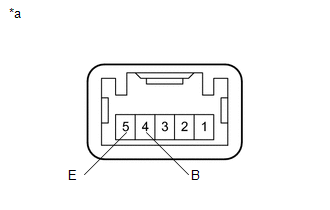
(1) Apply battery voltage to the blind spot monitor main switch (warning canceling switch assembly) and check that the switch indicator operates.

Text in Illustration

*a

Component without harness connected

(Blind Spot Monitor Main Switch (Warning Canceling Switch Assembly))

OK:

Connection

Switch Condition

Specified Condition

Battery positive (+) → Terminal 4 (B)

Battery negative (-) → Terminal 5 (E)

Blind spot monitor main switch on

Indicator Illuminates

If the result is not as specified, replace the blind spot monitor main switch (warning canceling switch assembly).

Installation

INSTALLATION

PROCEDURE

1. INSTALL BLIND SPOT MONITOR MAIN SWITCH (WARNING CANCELING SWITCH ASSEMBLY)

(a) Engage the 2 claws to install the blind spot monitor main switch (warning cancel switch assembly).

2. INSTALL INSTRUMENT PANEL LOWER CENTER FINISH PANEL

(See page Blind Spot Monitor Sensor )

Park Assist / Monitoring
...

Blind Spot Monitor Sensor
...

Other materials:

Center Airbag Sensor Communication Stop Mode
DESCRIPTION Detection Item Symptom Trouble Area Center Airbag Sensor Communication Stop Mode Either condition is met: Communication stop for "Airbag" is indicated on the "Communication Bus Check" sc ...

Invalid Data Received From Vehicle Dynamics Control Module (U0416)
DESCRIPTION This DTC is detected if a wheel speed malfunction signal is sent from the skid control ECU (brake actuator assembly). DTC No. Detection Item DTC Detection Condition Trouble Area U0416 Invalid Data Received From V ...

Short in GPS Antenna (B15C0,B15C1)
DESCRIPTION These DTCs are stored when a malfunction occurs in the navigation antenna assembly. DTC No. DTC Detection Condition Trouble Area B15C0 Navigation antenna error Navigation antenna assembly Radio and ...

© 2011-2026 Copyright www.ttguide.net