Components
COMPONENTS
ILLUSTRATION
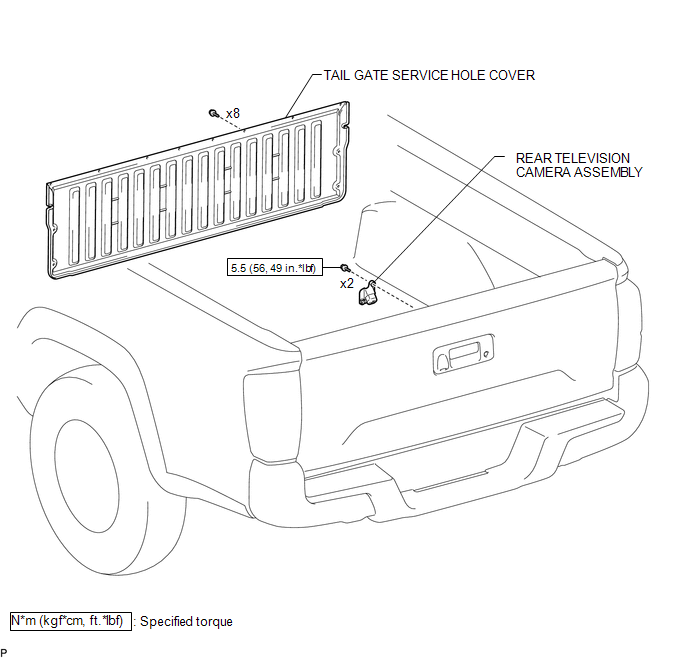
Installation
INSTALLATION
PROCEDURE
1. INSTALL REAR TELEVISION CAMERA ASSEMBLY
(a) Install the rear television camera assembly with the 2 bolts.
Torque:
5.5 N·m {56 kgf·cm, 49 in·lbf}
(b) Connect the connector.
2. INSTALL TAIL GATE SERVICE HOLE COVER
(See page
)
3. INSTALL TAIL GATE PROTECTOR
(See page
)
Removal
REMOVAL
PROCEDURE
1. REMOVE TAIL GATE PROTECTOR
(See page
)
2. REMOVE TAIL GATE SERVICE HOLE COVER
(See page
)
3. REMOVE REAR TELEVISION CAMERA ASSEMBLY
|
(a) Disconnect the connector. |
|
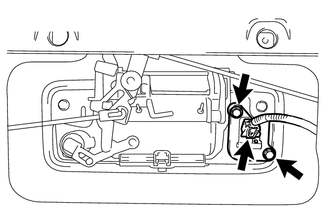
(b) Remove the 2 bolts and rear television camera assembly.
Image from Camera for Rear View Monitor is AbnormalPosition Initialization Incomplete (B2343)
DESCRIPTION
This DTC is stored when the sliding roof ECU (sliding roof drive gear sub-assembly)
has not been initialized.
DTC No.
DTC Detection Condition
Trouble Area
B2343
Sliding roof ECU (sliding roof drive gear sub-assembly) has no ...
Diagnosis System
DIAGNOSIS SYSTEM
1. DESCRIPTION
When troubleshooting a vehicle with the diagnosis system, the only difference
from the usual troubleshooting procedure is connecting the Techstream to the vehicle
and reading various data output from the vehicle's skid control ECU (brake actuator
assembly) ...
Freeze Frame Data
FREEZE FRAME DATA
CHECK FREEZE FRAME DATA
HINT:
The ECU records vehicle and driving condition information as freeze frame data
the moment a DTC is stored.
(a) Connect the Techstream to the DLC3.
(b) Turn the ignition switch to ON.
(c) Turn the Techstream on.
(d) Enter the following menus: P ...