DESCRIPTION
The navigation receiver assembly sends a sound signal to the stereo component amplifier assembly via this circuit.
The sound signal that has been sent is amplified by the stereo component amplifier assembly, and then is sent to the speakers.
If there is an open or short in the circuit, sound cannot be heard from the speakers even if there is no malfunction in the stereo component amplifier assembly or speakers.
WIRING DIAGRAM
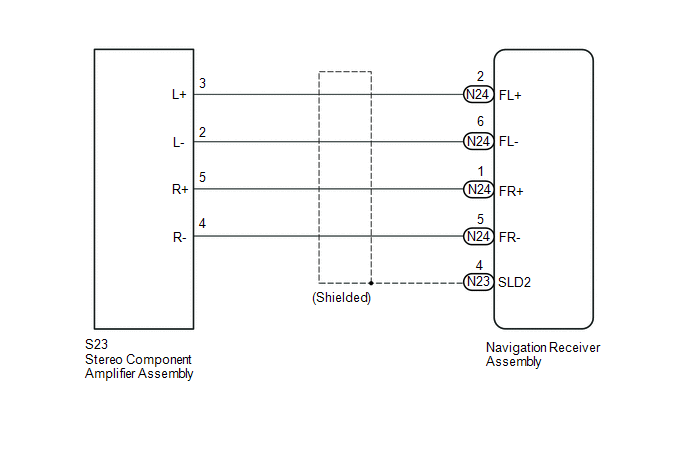
PROCEDURE
|
1. |
CHECK HARNESS AND CONNECTOR (NAVIGATION RECEIVER ASSEMBLY - STEREO COMPONENT AMPLIFIER ASSEMBLY) |
(a) Disconnect the N23 and N24 navigation receiver assembly connector.
(b) Disconnect the S23 stereo component amplifier assembly connector.
(c) Measure the resistance according to the value(s) in the table below.
Standard Resistance:
|
Tester Connection |
Condition |
Specified Condition |
|---|---|---|
|
S23-3 (L+) - N24-2 (FL+) |
Always |
Below 1 Ω |
|
S23-2 (L-) - N24-6 (FL-) |
Always |
Below 1 Ω |
|
S23-5 (R+) - N24-1 (FR+) |
Always |
Below 1 Ω |
|
S23-4 (R-) - N24-5 (FR-) |
Always |
Below 1 Ω |
|
S23-3 (L+) - Body ground |
Always |
10 kΩ or higher |
|
S23-2 (L-) - Body ground |
Always |
10 kΩ or higher |
|
S23-5 (R+) - Body ground |
Always |
10 kΩ or higher |
|
S23-4 (R-) - Body ground |
Always |
10 kΩ or higher |
|
N23-4 (SLD2) - Body ground |
Always |
10 kΩ or higher |
| OK | .gif) |
PROCEED TO NEXT SUSPECTED AREA SHOWN IN PROBLEM SYMPTOMS TABLE |
| NG | |
REPAIR OR REPLACE HARNESS OR CONNECTOR |

