INSTALLATION
PROCEDURE
1. INSTALL HYDRAULIC BRAKE BOOSTER
(a) Install a new brake booster gasket onto the hydraulic brake booster.
(b) Install the hydraulic brake booster with the 4 nuts.
Torque:
14 N·m {145 kgf·cm, 10 ft·lbf}
|
(c) Using a union nut wrench, connect the 4 brake lines to the correct positions of the hydraulic brake booster, as shown in the illustration. Text in Illustration
Torque: without union nut wrench : 15 N·m {155 kgf·cm, 11 ft·lbf} with union nut wrench : 14 N·m {145 kgf·cm, 10 ft·lbf} HINT:
|
|
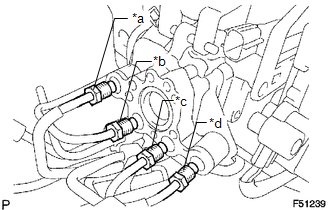
(d) Connect the 3 connectors.
2. INSTALL MASTER CYLINDER PUSH ROD CLEVIS
.gif)
3. INSTALL LOWER NO. 1 INSTRUMENT PANEL AIRBAG ASSEMBLY
(See page )
4. INSPECT BRAKE PEDAL HEIGHT
5. INSPECT PEDAL FREE PLAY
6. INSPECT PEDAL RESERVE DISTANCE
7. FILL RESERVOIR WITH BRAKE FLUID
8. BLEED BRAKE BOOSTER WITH ACCUMULATOR PUMP ASSEMBLY
9. BLEED BRAKE LINE
10. BLEED MASTER CYLINDER SOLENOID
11. INSPECT FLUID LEVEL IN RESERVOIR
12. INSPECT FOR BRAKE FLUID LEAK
13. INSPECT BRAKE MASTER CYLINDER OPERATION