INSTALLATION
PROCEDURE
1. INSPECT PROPELLER SHAFT WITH CENTER BEARING ASSEMBLY (with Grease Fitting)
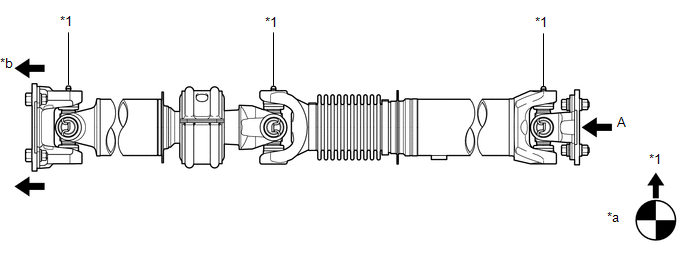 Text in Illustration
|
*1 |
Grease Fitting |
- |
- |
|
*a |
View A |
*b |
Front Side |
HINT:
When replacing the spider bearing, make sure that the grease fitting assembly hole is facing in the direction shown in the illustration.
2. INSTALL PROPELLER SHAFT WITH CENTER BEARING ASSEMBLY
|
(a) Align the matchmarks on the propeller shaft flange yoke and transfer flange. Text in Illustration
|
|
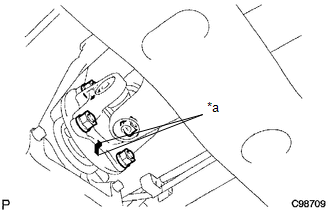
(b) Install the propeller shaft with the 4 nuts and 4 washers.
Torque:
88 N·m {899 kgf·cm, 65 ft·lbf}
|
(c) Align the matchmarks on the propeller shaft flange yoke and differential flange. Text in Illustration
|
|
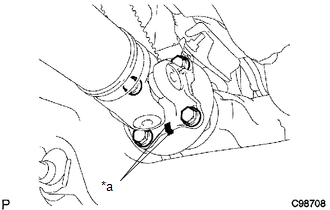
(d) for Differential Type BD20:
(1) Install the propeller shaft with the 4 bolts, 4 washers and 4 nuts.
Torque:
88 N·m {899 kgf·cm, 65 ft·lbf}
(e) for Differential Type BD22:
(1) Install the propeller shaft with the 4 washers and 4 nuts.
Torque:
88 N·m {899 kgf·cm, 65 ft·lbf}
|
(f) Provisionally install the center support bearing with 2 mounting bolts. Text in Illustration
HINT: Make sure the bearing is installed with the drain hole facing downwards. |
|
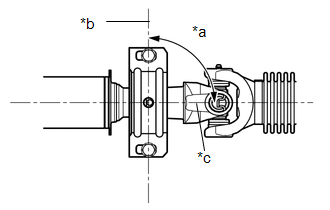
(g) Tighten the 2 bolts.
Torque:
36 N·m {369 kgf·cm, 27 ft·lbf}

