Components
COMPONENTS
ILLUSTRATION
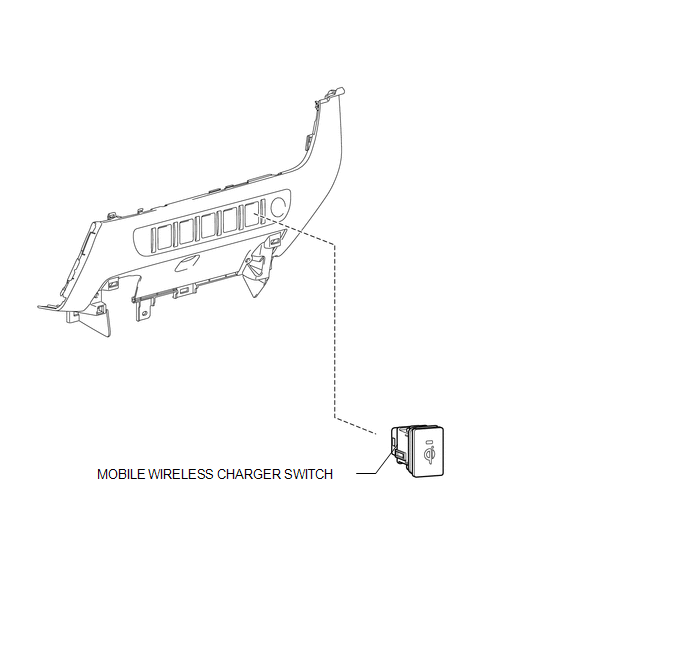
Removal
REMOVAL
PROCEDURE
1. REMOVE INSTRUMENT PANEL LOWER CENTER FINISH PANEL
(See page .gif) )
)
2. REMOVE MOBILE WIRELESS CHARGER SWITCH
|
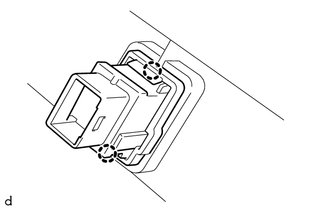
(a) Disengage the 2 claws to remove the mobile wireless charger switch. |
|
Inspection
INSPECTION
PROCEDURE
1. INSPECT MOBILE WIRELESS CHARGER SWITCH
(a) Check the mobile wireless charger switch.
|
(1) Measure the resistance according to the value(s) in the table below. Standard Resistance:
If the result is not as specified, replace the mobile wireless charger switch. |
|
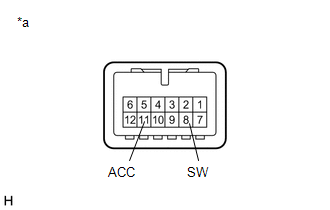
(b) Check that the switch indicator light illuminates.
|
(1) Apply battery voltage to the mobile wireless charger switch connector and check the operation of the switch indicator light. OK:
If the result is not as specified, replace the mobile wireless charger switch. |
|
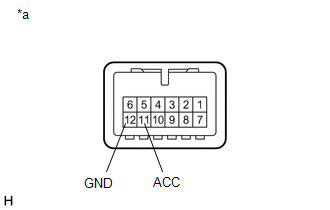
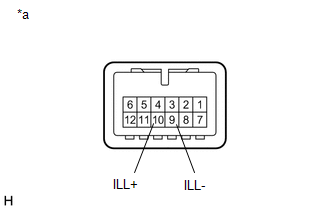
(c) Check that the switch illuminates.
|
(1) Apply battery voltage to the mobile wireless charger switch and check that the switch illuminates. OK:
If the result is not as specified, replace the mobile wireless charger switch. |
|
Installation
INSTALLATION
PROCEDURE
1. INSTALL MOBILE WIRELESS CHARGER SWITCH
(a) Engage the 2 claws to install the mobile wireless charger switch.
2. INSTALL INSTRUMENT PANEL LOWER CENTER FINISH PANEL
(See page .gif) )
)