DESCRIPTION
The skid control ECU (master cylinder solenoid) is connected to the combination meter via CAN communication.
The combination meter has a built-in VSC warning buzzer:
- Sounds intermittently to inform the driver if the temperature of hydraulic brake booster has increased excessively due to continuous operation of TRAC, A-TRAC and AUTO LSD.
- Sounds intermittently to inform the driver that the VSC is operating.
- Sounds continuously to alert the driver that the hydraulic pressure of accumulator in the hydraulic brake booster has decreased.
WIRING DIAGRAM
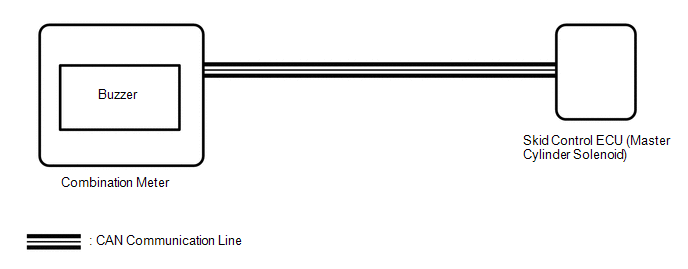
CAUTION / NOTICE / HINT
NOTICE:
When replacing the skid control ECU (master cylinder solenoid), perform the zero
point calibration (See page .gif) ).
).
PROCEDURE
|
1. |
CHECK CAN COMMUNICATION SYSTEM |
(a) Turn the ignition switch off.
(b) Connect the Techstream to the DLC3.
(c) Turn the ignition switch to ON.
(d) Turn the Techstream on.
(e) Select CAN Bus Check from the System Selection Menu screen and follow the
prompts on the screen to inspect the CAN bus (See page
).
OK:
CAN Bus Check indicates no malfunctions in CAN communication.
| NG | .gif) |
GO TO CAN COMMUNICATION SYSTEM (HOW TO PROCEED WITH TROUBLESHOOTING) |
|
.gif)
|
2. |
PERFORM ACTIVE TEST USING TECHSTREAM (BUZZER) |
(a) Connect the Techstream to the DLC3.
(b) Turn the ignition switch to ON.
(c) Turn the Techstream on.
(d) Enter the following menus: Chassis / ABS/VSC/TRAC / Active Test.
(e) According to the display on the tester, perform the Active Test.
ABS/VSC/TRAC|
Tester Display |
Test Part |
Control Range |
Diagnostic Note |
|---|---|---|---|
|
Buzzer |
VSC warning buzzer |
Buzzer OFF/ON |
The buzzer can be heard |
(f) Check that the buzzer sounds or stops in accordance with the Techstream.
Result|
Result |
Proceed to |
|---|---|
|
Buzzer does not sound or stop |
A |
|
Buzzer sounds and stops |
B |
| B | |
USE SIMULATION METHOD TO CHECK |
|
|
3. |
REPLACE COMBINATION METER ASSEMBLY |
(a) Turn the ignition switch off.
(b) Replace the combination meter (See page
).
|
|
4. |
PERFORM ACTIVE TEST USING TECHSTREAM (BUZZER) |
(a) Connect the Techstream to the DLC3.
(b) Turn the ignition switch to ON.
(c) Turn the Techstream on.
(d) Enter the following menus: Chassis / ABS/VSC/TRAC / Active Test.
(e) According to the display on the tester, perform the Active Test.
ABS/VSC/TRAC|
Tester Display |
Test Part |
Control Range |
Diagnostic Note |
|---|---|---|---|
|
Buzzer |
VSC warning buzzer |
Buzzer OFF/ON |
The buzzer can be heard |
(f) Check that the buzzer sounds or stops in accordance with the Techstream.
Result|
Result |
Proceed to |
|---|---|
|
Buzzer does not sound or stop |
A |
|
Buzzer sounds and stops |
B |
| A | |
REPLACE MASTER CYLINDER SOLENOID |
| B | |
END |