
Toyota Tacoma (2015-2018) Service Manual: Rear Seat Inner Belt Assembly(for Double Cab)
Installation
INSTALLATION
PROCEDURE
1. INSTALL REAR SEAT INNER BELT ASSEMBLY
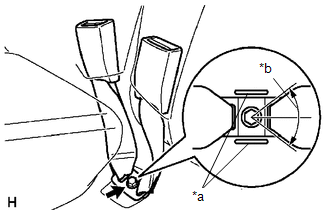
(a) for LH Side:
|
(1) Install the rear seat inner belt assembly with the bolt. Text in Illustration
Torque: 42 N·m {428 kgf·cm, 31 ft·lbf} NOTICE:
|
|
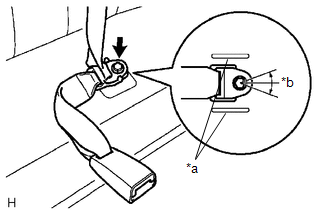
(b) for RH Side:
|
(1) Connect the rear seat inner belt assembly and rear center seat outer belt assembly by installing the floor anchor with the bolt. Text in Illustration
Torque: 42 N·m {428 kgf·cm, 31 ft·lbf} NOTICE:
|
|
Removal
REMOVAL
PROCEDURE
1. REMOVE REAR SEAT INNER BELT ASSEMBLY
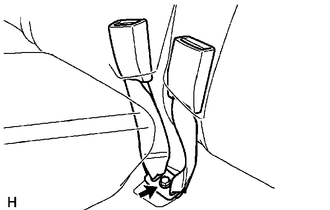
(a) for LH Side:
|
(1) Remove the bolt and rear seat inner belt assembly. |
|
(b) for RH Side:
|
(1) Remove the bolt and rear seat inner belt assembly. |
|
.png)
 Rear Seat Inner Belt Assembly(for Access Cab)
Components
COMPONENTS
ILLUSTRATION
Removal
REMOVAL
PROCEDURE
1. REMOVE REAR NO. 1 SEAT INNER BELT ASSEMBLY
(a) Open the 2 anchor covers.
(b) Loosen the 2 bolts to remove the 2 ...

Other materials:
ABS Control System Malfunction (43)
DESCRIPTION
This DTC is output when the VSC system detects a malfunction in the ABS system.
When DTC 43 is stored, there is no malfunction in the skid control ECU (master cylinder
solenoid).
DTC No.
DTC Detecting Condition
Trouble Areas
43
...
On-vehicle Inspection
ON-VEHICLE INSPECTION
PROCEDURE
1. CHECK BATTERY CONDITION
NOTICE:
If the battery is weak or if the engine is difficult to start, recharge the battery
and perform inspections again before returning the vehicle to the customer.
(a) Check the battery for damage or deformation. If severe damage, ...
Abnormal Change in Output Signal of Front Speed Sensor RH (Test Mode DTC) (C1275,...,C1414)
DESCRIPTION
Refer to DTCs C1401 and C1402 (See page ).
DTC Code
DTC Detection Condition
Trouble Area
C1275
C1276
Stored only during test mode.
Front speed sensor RH/LH
Front speed sensor rotor RH/LH (Front ...
