PROCEDURE
|
1. |
CHECK PANEL SWITCH |
(a) Check for foreign matter around the switches that might prevent operation.
OK:
No foreign matter is found.
| NG | .gif) |
REMOVE ANY FOREIGN MATTER FOUND |
|
.gif)
|
2. |
CHECK PANEL SWITCH (OPERATION CHECK) |
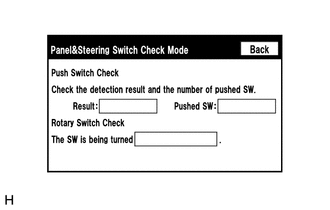
(a) Enter the "Panel & Steering Switch Check Mode" screen. Refer to Check Panel
& Steering Switch in Operation Check (See page .gif) ).
).
(b) Operate the abnormal switch and check if the switch status is correctly displayed.
OK:
The switch status is correctly displayed as operated.
| OK | |
REPLACE RADIO AND DISPLAY RECEIVER ASSEMBLY |
| NG | |
PROCEED TO NEXT SUSPECTED AREA SHOWN IN PROBLEM SYMPTOMS TABLE |