Components
COMPONENTS
ILLUSTRATION
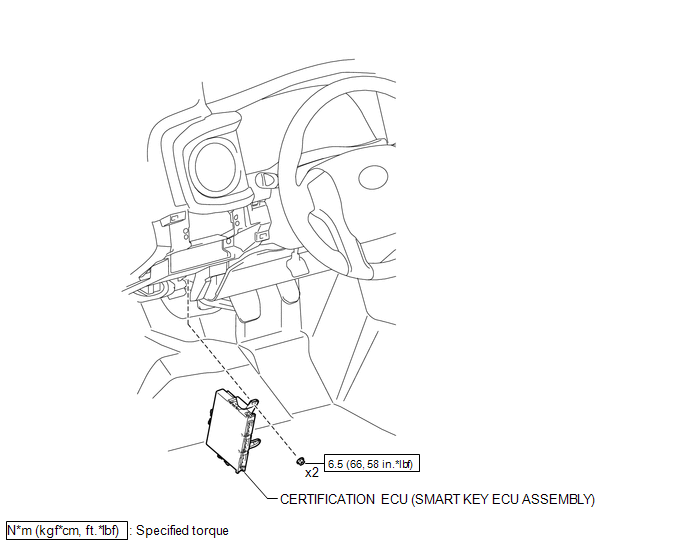
Installation
INSTALLATION
PROCEDURE
1. INSTALL CERTIFICATION ECU (SMART KEY ECU ASSEMBLY)
(a) Install the certification ECU (smart key ECU assembly) with the 2 nuts.
Torque:
6.5 N·m {66 kgf·cm, 58 in·lbf}
(b) Engage the clamp to install the wire harness.
(c) Connect the 3 connectors.
2. INSTALL INSTRUMENT PANEL LOWER FINISH PANEL SUB-ASSEMBLY
(See page
)
Removal
REMOVAL
PROCEDURE
1. REMOVE INSTRUMENT PANEL LOWER FINISH PANEL SUB-ASSEMBLY
(See page
)
2. REMOVE CERTIFICATION ECU (SMART KEY ECU ASSEMBLY)
|
(a) Disconnect the 3 connectors. |
|
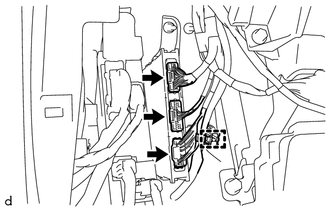
(b) Disengage the clamp to separate the wire harness.
|
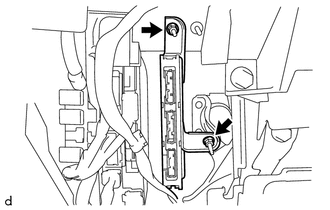
(c) Remove the 2 nuts and certification ECU (smart key ECU assembly). |
|
Problem Symptoms Table
PROBLEM SYMPTOMS TABLE
If a normal code is displayed during the DTC check but the problem still occurs,
check the circuits for each problem symptom in the order given in the table below
and proceed to the relevant troubleshooting page.
NOTICE:
When replacing the skid control ECU (master cylin ...
Illumination for Panel Switch does not Come on with Tail Switch ON
PROCEDURE
1.
CHECK VEHICLE SIGNAL (OPERATION CHECK)
(a) Enter the "Vehicle Signal Check Mode" screen. Refer to Check Vehicle Signal
in Operation Check (See page ).
(b) Check that the display changes between ON and OFF according to the light
control ...
Lost Communication with Meter (B1324)
DESCRIPTION
This DTC is stored when a communication error occurs between the radio and display
receiver assembly and combination meter assembly.
DTC No.
DTC Detection Condition
Trouble Area
B1324
After the radio and display receiver as ...