CAUTION / NOTICE / HINT
NOTICE:
- Some satellite radio broadcasts require payment. A contract must be made between a satellite radio company and the user. If the contract expires, it will not be possible to listen to the broadcast.
- After replacing the stereo component tuner assembly of vehicles subscribed to pay-type satellite radio broadcasts, XM radio ID registration is necessary.
PROCEDURE
|
1. |
CHECK SURROUNDINGS |
(a) Check if the vehicle is in an environment where reception is difficult due to something blocking the area above the vehicle.
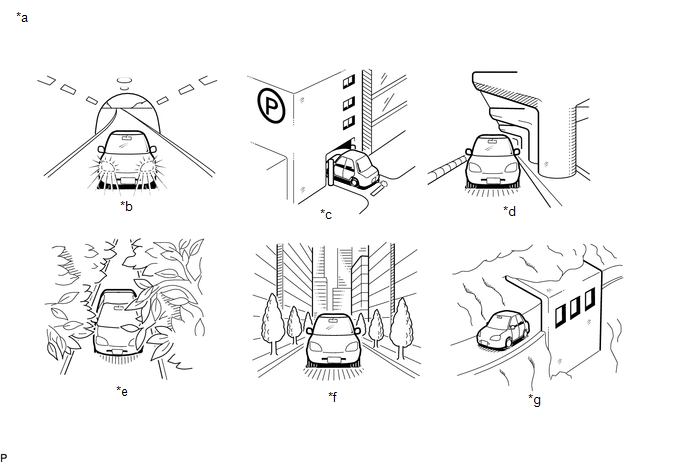 Text in Illustration
|
*a |
Example |
*b |
In a tunnel |
|
*c |
In a building |
*d |
Under an overpass |
|
*e |
On a forest or tree-lined path |
*f |
Between tall buildings |
|
*g |
Under a cliff or overhang |
- |
- |
HINT:
If the area above the vehicle is blocked, such as when in a building or tunnel, reception may not be possible.
OK:
Area above vehicle is not blocked.
| NG | .gif) |
END (MOVE VEHICLE TO LOCATION WHERE RECEPTION IS BETTER) |
|
.gif)
|
2. |
CHECK RADIO AND DISPLAY RECEIVER ASSEMBLY |
(a) Check if CH001 (free broadcast) can be received.
OK:
CH001 can be received.
| NG | |
GO TO STEP 6 |
|
|
3. |
CHECK DISPLAY SETTING |
(a) Check the display screen.
Result|
Result |
Proceed to |
|---|---|
|
"Updating" is displayed |
A |
|
"-----" is displayed |
B |
|
None of the displays above are shown |
C |
| B | |
THERE IS NO SONG/PROGRAM TITLE OR ARTIST NAME/FEATURE ASSOCIATED WITH CHANNEL AT THAT TIME |
| C | |
GO TO STEP 6 |
|
|
4. |
CHECK CONTRACT CONDITIONS |
(a) Check if the pay-type contract has been extended, or if the contract period has ended.
OK:
Pay-type contract is valid.
| NG | |
TO RECEIVE PAY-TYPE BROADCASTS, CONTRACT MUST BE MADE WITH SATELLITE RADIO COMPANY |
|
|
5. |
PERFORM ACTIVATION REFRESH |
(a) Perform activation refresh by referring to the satellite radio company web site (https://care.siriusxm.com/retailrefresh_view.action).
OK:
Malfunction disappears.
HINT:
The XM radio ID that is necessary to perform activation refresh is displayed when CH000 is selected on the satellite radio.
| OK | |
END |
| NG | |
PROCEED TO NEXT SUSPECTED AREA SHOWN IN PROBLEM SYMPTOMS TABLE |
|
6. |
CHECK DISPLAY |
(a) Check the display screen.
Result|
Result |
Proceed to |
|---|---|
|
"SAT Check Antenna" is displayed |
A |
|
"SAT N. Signal" is displayed |
B |
|
"Loading" is displayed |
|
|
"SAT Channel Off Air" is displayed |
C |
|
After "---" is displayed, display automatically switches to CH001 |
D |
|
"SAT Ch Unauthorized" is displayed |
E |
|
"SAT Chan Unavailable" is displayed |
|
|
None of the displays above are shown |
| B | |
END (MOVE VEHICLE TO LOCATION WHERE RECEPTION IS BETTER) |
| C | |
CHANNEL IS CURRENTLY NOT BEING BROADCAST. BROADCAST CAN BE LISTENED TO OR VIEWED WHEN IT IS BACK ON AIR. (CONFIRM WITH RADIO STATION) |
| D | |
CHANNEL BROADCAST HAS ENDED CONDITION (CONFIRM WITH RADIO STATION) |
| E | |
GO TO STEP 10 |
|
|
7. |
REPLACE ANTENNA CORD SUB-ASSEMBLY |
(a) Replace the antenna cord sub-assembly with a new or known good one and check
if radio broadcasts can be received normally (See page
.gif) ).
).
OK:
Radio broadcasts can be received normally.
| OK | |
END |
|
|
8. |
REPLACE NO. 2 ANTENNA CORD SUB-ASSEMBLY |
(a) Replace the No. 2 antenna cord sub-assembly with a new or known good one
and check if radio broadcasts can be received normally. (See page
).
OK:
Radio broadcasts can be received normally.
| OK | |
END |
|
|
9. |
REPLACE ANTENNA ASSEMBLY WITH HOLDER |
(a) Replace the antenna assembly with holder with a new or known good one and
check if radio broadcasts can be received normally (See page
).
OK:
CH000 is selected.
| OK | |
END |
| NG | |
PROCEED TO NEXT SUSPECTED AREA SHOWN IN PROBLEM SYMPTOMS TABLE |
|
10. |
CONFIRM CURRENTLY SELECTED CHANNEL |
(a) Confirm if CH000 is currently selected.
OK:
CH000 is selected.
| OK | |
END (CH000 HAS NO SOUND. SELECT ANOTHER CHANNEL) |
| NG | |
PROCEED TO NEXT SUSPECTED AREA SHOWN IN PROBLEM SYMPTOMS TABLE |

