Toyota Tacoma manuals

Toyota Tacoma (2005–2015) Owners Manual: Power outlets (12 VDC)

Please use as a power supply for electronic goods that use less than 12 VDC/10 A (power consumption of 120 W).

When using electronic goods, make sure that the power consumption of all the connected power outlets is less than 120 W.
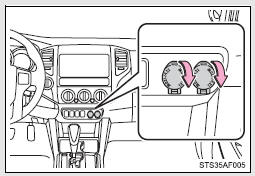
■The power outlets can be used when

■The power outlets can be used when

The engine switch is in the ACC or ON position.

NOTICE

■To avoid damaging the power outlets

Close the power outlets lid when not in use.

Foreign objects or liquids that enter the power outlets may cause a short circuit.

■To prevent the battery from being discharged

Do not use the power outlets longer than necessary when the engine is not running.

Clock
Adjusts the hours Adjusts the minutes ■The clock is displayed when The engine switch is in the ACC or ON position. ■When disconnecting and reconnecting battery terminals The time ...

Power outlet (120 VAC)∗
The power outlet can be used for electrical appliances. Main switch To use the power outlet, turn on the main switch. The power supply starts a few seconds after the main switch is pressed. Pow ...

Other materials:

System Description
SYSTEM DESCRIPTION 1. SEAT BELT WARNING SYSTEM DESCRIPTION (a) Seat belt warning light operation for driver seat belt: The seat belt warning light on the combination meter assembly illuminates, blinks or turns off in accordance with the driver seat belt state, vehicle speed, shift lever posit ...

System Description
SYSTEM DESCRIPTION 1. POWER DOOR LOCK CONTROL SYSTEM DESCRIPTION (a) The power door lock system locks/unlocks all the doors. The main body ECU (multiplex network body ECU) receives lock/unlock request signals from a door control switch or the driver door key lock and unlock switch. Then, the ...

Dtc Check / Clear
DTC CHECK / CLEAR NOTICE: When using the Techstream with the engine switch off, connect the Techstream to the DLC3 and turn a courtesy light switch on and off at intervals of 1.5 seconds or less until communication between the Techstream and the vehicle begins. Then select the vehicle type u ...

© 2011-2026 Copyright www.ttguide.net