Drive in a good posture as follows:
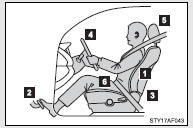
 Sit upright and well back in the
seat.
Sit upright and well back in the
seat.
 Adjust the position of the seat
forward or backward to ensure the pedals can be reached and easily depressed to
the extent required.
Adjust the position of the seat
forward or backward to ensure the pedals can be reached and easily depressed to
the extent required.
 Adjust the seatback so that the
controls are easily operable.
Adjust the seatback so that the
controls are easily operable.
 Adjust the tilt and telescopic positions
of the steering wheel downward so the airbag is facing your chest.
Adjust the tilt and telescopic positions
of the steering wheel downward so the airbag is facing your chest.
 Lock the head restraint in place
with the center of the head restraint closest to the top of your ears.
Lock the head restraint in place
with the center of the head restraint closest to the top of your ears.
 Wear the seat belt correctly.
CAUTION
■While driving
●Do not adjust the position of the driver’s seat while driving.
Doing so could cause the driver to lose control of the vehicle.
●Do not place a cushion between the driver or passenger and the seatback.
A cushion may prevent correct posture from being achieved, and reduce the effectiveness of the seat belt and head restraint, increasing the risk of death or serious injury to the driver or passenger.
●Do not place anything under the front seats.
Objects placed under the front seats may become jammed in the seat tracks and stop the seat from locking in place. This may lead to an accident.
The adjustment mechanism may also be damaged.
■Adjusting the seat position
●Take care when adjusting the seat position to ensure that other passengers are not injured by the moving seat.
●Do not put your hands under the seat or near the moving parts to avoid injury.
Fingers or hands may become jammed in the seat mechanism.